


TeamLinkt - Sports Team App
4.780.00 Reviews
App Specs
- Version
- 2026.32.0
- Updated On
- License
- Free
- Downloads
- 100,000+
- Developer
- QuickLinkt App
- Categories
- Sports
- Platform
- Android
Screenshots
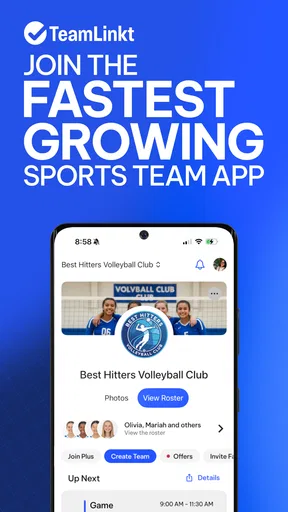
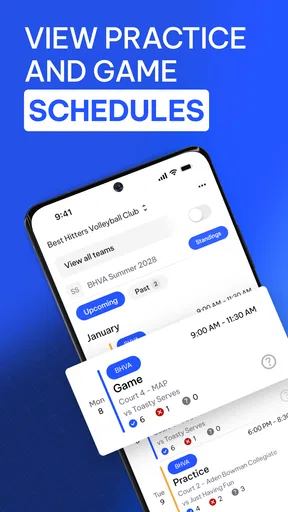
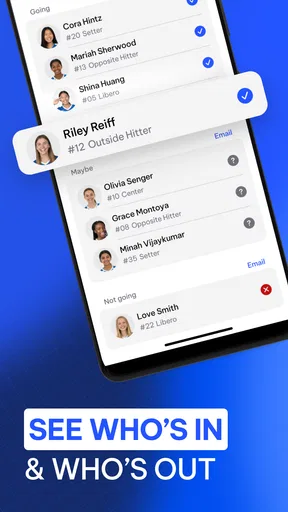
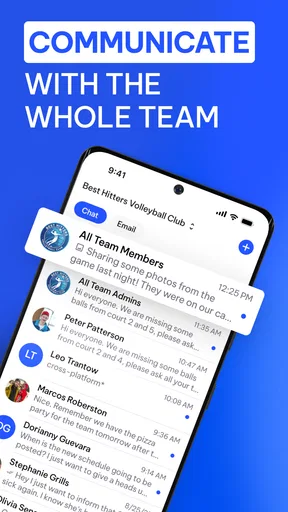
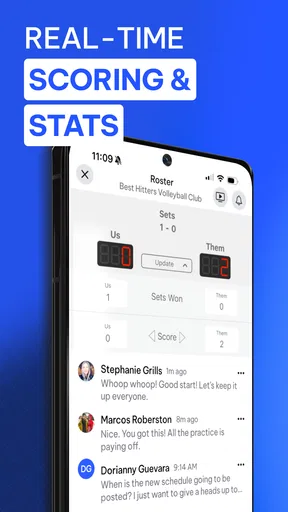
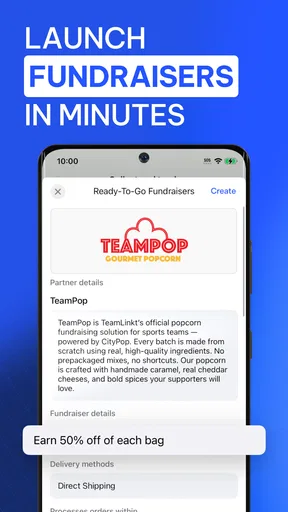
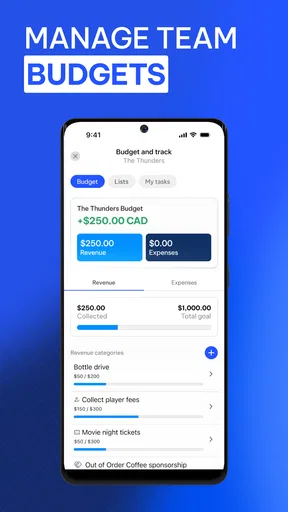
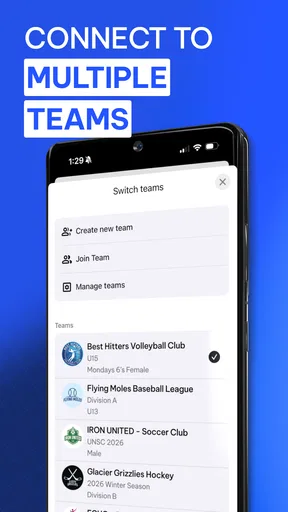
 Analysis by AppCompare
Running a sports team usually becomes difficult in the spaces between activities: someone needs the schedule, another player has not confirmed availability, a parent asks where the next game is, and the coach is trying to keep a conversation from disappearing in a busy group chat. I tested TeamLinkt as a way to bring those everyday tasks into one place, and I found its main value in reducing the number of separate messages and reminders a team needs.
TeamLinkt is a free sports app from QuickLinkt App, aimed at full team management rather than scores, training videos, or individual fitness tracking. Its central tools cover schedules, rosters, availability, chat, and related team coordination. The app is available for everyone, runs on operating systems from version 11 onward, and has reached more than 100 thousand installs. A 4.7 average from around 6.9 thousand ratings suggests that its basic approach works well for many users, although the experience still depends heavily on how consistently a team uses it.
How TeamLinkt turns a messy team week into one shared workflow
I found the most useful way to judge a shared team app is to look at the handoffs: who posts the event, who checks attendance, and where a late change becomes visible to everyone who needs it. That practical lens also makes it easier to tell whether the app will feel quick during a busy week or simply add another stop. Next, I’d look at how the routine holds up when several updates arrive close together.
Starting with the problem, not the app
The best way to understand TeamLinkt is to imagine a normal week for a local team. A coach has a match to organize, players have changing work or school commitments, and families need practical information without searching through old messages. In the usual setup, the schedule might live in a calendar, availability might be collected in a chat, and the roster might exist in a spreadsheet. Each tool can work on its own, but the connections between them are fragile.
TeamLinkt is useful because it treats those details as parts of the same team space. Instead of asking players to remember which conversation contains the latest update, the organizer can place the relevant information where the team already expects to find it. I found this especially helpful for recurring activities, where the same questions otherwise return every week: who is attending, what time is the event, and who needs to be contacted?
The app is not trying to replace every sports service. It is better understood as an organizing layer for a team. If you want detailed athletic analysis, live match statistics, or a personal training plan, this is not the tool I would choose first. If your main problem is coordination, however, TeamLinkt addresses a very real source of stress.
Building the team space
The first practical step is getting the team structure into the app. The roster is more than a list of names when it is used properly: it becomes the reference point for communication and availability. That matters because a group chat often includes people who do not need every message, while a team management app can keep the conversation connected to the people involved in the activity.
Worth Reading Before You Choose

Flipboard Shows What News Apps Must Do Beyond the Feed

Switching to Android Auto Means Rethinking Your Driving Routine

Google Calendar Makes a Crowded Week Easier to Manage

Ludo King Makes the Most of the Minutes Between Plans

Baby Panda World Brings Quick Play to Modern Phones, but Its Game Library Feels Busy

ESPN’s Live Game View Makes Following Close Games Easier
I recommend setting up the roster before adding a large amount of conversation. This creates a clean starting point and makes later updates easier to interpret. It also encourages a useful habit: treat the roster as the current source of truth, rather than relying on someone to remember that a player changed teams or that a family member is now handling communication.
There is a small but important trade-off here. A shared system only stays reliable when someone takes responsibility for keeping it current. TeamLinkt can centralize the information, but it cannot decide whether the coach, manager, or another volunteer should maintain it. For a very small group that already communicates easily, creating another space may feel unnecessary. For a growing team, the structure becomes more valuable as soon as informal arrangements start causing mistakes.
Adding an event and collecting availability
Once the team is organized, the next step is the schedule. This is where the app’s workflow becomes more useful than a simple announcement. A date and time can be shared with the group, while availability gives players a way to respond rather than forcing the organizer to ask for individual confirmations.
In my experience, the real benefit is not the first announcement; it is the follow-up. A message in a chat can be read and forgotten, but an availability response gives the organizer something more actionable. Before finalizing a lineup, the coach can see which players have indicated that they can attend and identify the people who still need a reminder.
A practical routine is to publish the event early, ask for availability immediately, and then use chat only for exceptions. For example, a player who can attend but will arrive late can explain that in the conversation, while the main availability record remains easy to read. This avoids turning the schedule into a long discussion and keeps special circumstances from obscuring the basic attendance picture.
This is one of the less obvious strengths of TeamLinkt: it can separate a decision from the conversation around that decision. The availability response answers “can you attend?”; chat can handle “what changed?” Keeping those purposes distinct makes the organizer’s job easier than collecting everything in a single stream of messages.
Handling handoffs between coach, player, and family
Team coordination rarely belongs to one person. A coach may create the event, a team manager may check responses, and a player or parent may need to communicate a change. TeamLinkt’s shared approach is most effective when those handoffs happen in the same place instead of moving through private messages.
Imagine a weekday match. The coach posts the event, players respond to availability, and the manager checks the roster before the lineup is settled. One player then realizes that a school commitment has changed. Rather than sending a direct message that only the coach sees, the update can be handled through the team’s shared communication flow. The people who need context are less likely to work from an outdated assumption.
This does not mean every message should go to everyone. Good team management still requires judgment about what belongs in a general chat and what should be handled privately. The app helps by giving the team a common home, but it does not remove the need for sensible communication. I would encourage organizers to keep the main conversation focused on decisions, changes, and useful reminders instead of allowing it to become a running commentary.
For youth teams, the Everyone content rating makes the app approachable across a broad audience, but the adults responsible for the team should still establish clear expectations. Decide who updates attendance, who answers logistical questions, and how last-minute changes are communicated. The technology works better when those rules are agreed before the first urgent situation.
Using chat without letting it take over
The chat feature is valuable because sports teams need context. A schedule alone cannot explain a late arrival, a changed plan, or a question about an event. At the same time, chat is also where many coordination systems become noisy. If every detail is posted as a separate message, the information the team needs most can become difficult to find.
I would use TeamLinkt’s chat as a companion to the schedule, not as a replacement for it. Put stable information in the relevant event or roster context, then use messages for clarification and timely updates. A short note such as “I can attend but will arrive after the start” is more useful than a long back-and-forth that leaves the final status unclear.
Another useful habit is to restate the outcome after a discussion. If the team agrees on a change, post the final version plainly. This creates a visible handoff from conversation to action and reduces the chance that people follow an earlier suggestion. It is a small workflow improvement, but it matters when several people are coordinating under time pressure.
Reaching the result on match day
The outcome of the workflow is not simply that information has been entered. The real result is a team that knows what is happening and an organizer who can make decisions without reconstructing the week from scattered messages.
On match day, the schedule provides the shared reference, the roster shows who belongs in the team space, availability gives a clearer attendance picture, and chat handles the details that do not fit neatly into a calendar entry. That combination is more practical than any single feature on its own. It also creates a repeatable process: publish, confirm, clarify, update, and act.
I particularly like this structure for volunteer-run teams. Volunteers often have limited time and cannot spend an evening chasing confirmations. A centralized workflow does not eliminate work, but it shifts the work from repetitive questioning to checking and updating. That is a meaningful improvement when the same coordination tasks happen week after week.
The free price also lowers the barrier to trying it with a team. However, the app includes in-app purchases ranging from $1.99 to $4.99 per item, so I would review any purchase prompts carefully before assuming every part of the experience is included at no cost. For a team deciding whether to adopt it, the sensible approach is to test the everyday workflow first and discuss any paid elements openly with whoever manages the team.
Where the workflow can break
The biggest weakness is not a missing button; it is adoption. If half the team responds in the app and the other half continues using text messages, the organizer still has to reconcile two systems. In that situation, TeamLinkt may add another place to check rather than removing confusion. The app delivers its strongest results when the team agrees that schedules, availability, and important updates belong there.
There can also be friction at the beginning. People may need reminders to respond to availability, and organizers may be tempted to keep sending duplicate announcements through other channels. That is understandable during the transition, but it can prevent the team from forming a new habit. I would introduce the app around one clear event, explain exactly what action each person must take, and avoid maintaining parallel systems longer than necessary.
Another limitation is that a coordination app cannot solve unclear responsibilities. If nobody knows who is allowed to change an event, update the roster, or answer a logistical question, centralization alone will not produce clarity. Before blaming the app, teams should define ownership. The best workflow is usually one where the coach controls sporting decisions, a manager handles administrative updates, and players or families report changes promptly.
TeamLinkt may also be more than a casual group needs. Friends arranging an occasional pickup game could find a simple group message faster, especially if the roster and schedule change constantly. Likewise, a professional club that needs deep statistics, registration administration, or specialized performance tools may prefer a platform designed around those areas. TeamLinkt is strongest in the middle: organized enough to need structure, but not necessarily looking for a complex club-management suite.
Who should use it, and who should skip it?
I would recommend TeamLinkt to coaches, volunteer managers, school teams, amateur clubs, and families who are tired of attendance questions being buried in chat. It is particularly suitable when a team has recurring events, several people sharing responsibility, and enough schedule changes that a single message thread no longer feels dependable.
I would be more cautious for a solo athlete, a very small group with no recurring coordination problem, or anyone looking for training guidance rather than team administration. The app’s value comes from shared use. If you are the only person who needs the information, its team-centered structure is less compelling.
It is also worth considering the age and device requirements before inviting everyone. The app is rated for Everyone and requires operating system version 11 or later. That is straightforward for many current devices, but a team with older phones should check compatibility before making it the only communication route.
My recommendation after following the full process
TeamLinkt succeeds when it is treated as a workflow rather than just another messaging app. Start with a clean roster, publish the schedule, collect availability, use chat for exceptions, and confirm the final outcome in one visible place. Those handoffs are where the app earns its place, because they turn scattered responses into a decision the whole team can understand.
My honest view is that the app is most useful for teams that have outgrown informal coordination but do not need an elaborate sports management system. The interface and feature set are centered on practical organization, and the strong average rating reflects that many users find this approach effective. Still, the team must commit to using it consistently, and organizers should be prepared to manage the transition and any paid options thoughtfully.
QuickLinkt App has kept the focus on a common problem: getting the right people, schedule, and updates aligned. I would recommend trying it with one upcoming event instead of moving every historical detail at once. If the team can complete that event without returning to scattered messages, TeamLinkt is likely solving a real problem for you. If everyone continues using separate channels, a simpler alternative may be the better choice.
Pros
- Centralizes schedules
- rosters
- chats
- and updates in one place.
- Useful push notifications help players stay informed about changes.
- Supports multiple teams
- making it practical for families and clubs.
- Event details can include locations
- times
- and attendance information.
- Simplifies communication between coaches
- players
- and parents.
Cons
- Some features depend on the league or organization enabling them.
- The interface may feel busy when managing several teams or seasons.
- Requires regular notifications and permissions for the best experience.
- Limited value for users whose teams do not use TeamLinkt officially.
- Account setup can take time when entering player and team information.
FAQs for TeamLinkt - Sports Team App
What is TeamLinkt - Sports Team App used for?
TeamLinkt is designed to help sports teams, leagues, clubs, and tournament organizers manage activities in one place. After setting up a team or joining an existing organization, users can view schedules, receive announcements, communicate with teammates, track events, and stay informed about changes. The exact features available may depend on whether you are a player, parent, coach, administrator, or league organizer.
Can parents and players use TeamLinkt to manage schedules and attendance?
Yes. TeamLinkt can be useful for both players and parents who need to follow practices, games, tournaments, and other team events. Users can typically check event details, respond to availability requests, and receive updates from organizers. Parents managing more than one child should review each profile carefully, because schedules and notifications may be connected to different teams or organizations within the app.
Does TeamLinkt support communication between coaches, players, and families?
TeamLinkt includes communication features intended to keep sports groups informed without relying entirely on separate messaging services. Coaches and administrators may send announcements, reminders, or updates to selected teams or members, while participants can check relevant information from the app. However, the quality and frequency of communication depend on how actively the team or league administrator uses the platform.
Can TeamLinkt handle registration, payments, or tournament information?
Depending on the organization using it, TeamLinkt may provide access to registration forms, league details, tournament schedules, fees, and related administrative information. Not every team will enable all of these functions, so the experience can vary considerably between organizations. Before downloading, users should confirm whether their club or league uses TeamLinkt for payments and registration or only for scheduling and communication.
Is TeamLinkt free to download, and are there any costs to use it?
The app may be available to download at no charge, but that does not necessarily mean every sports program managed through TeamLinkt is free. Clubs, leagues, tournaments, or event organizers can set their own registration fees, participation costs, and payment requirements. Some features may also depend on the organization’s subscription or setup. Review the relevant team or league information before completing a purchase or registration.


